Deposit Widget
Route funds into a configured protocol or app action with Nexus intents.
Try Live Demo
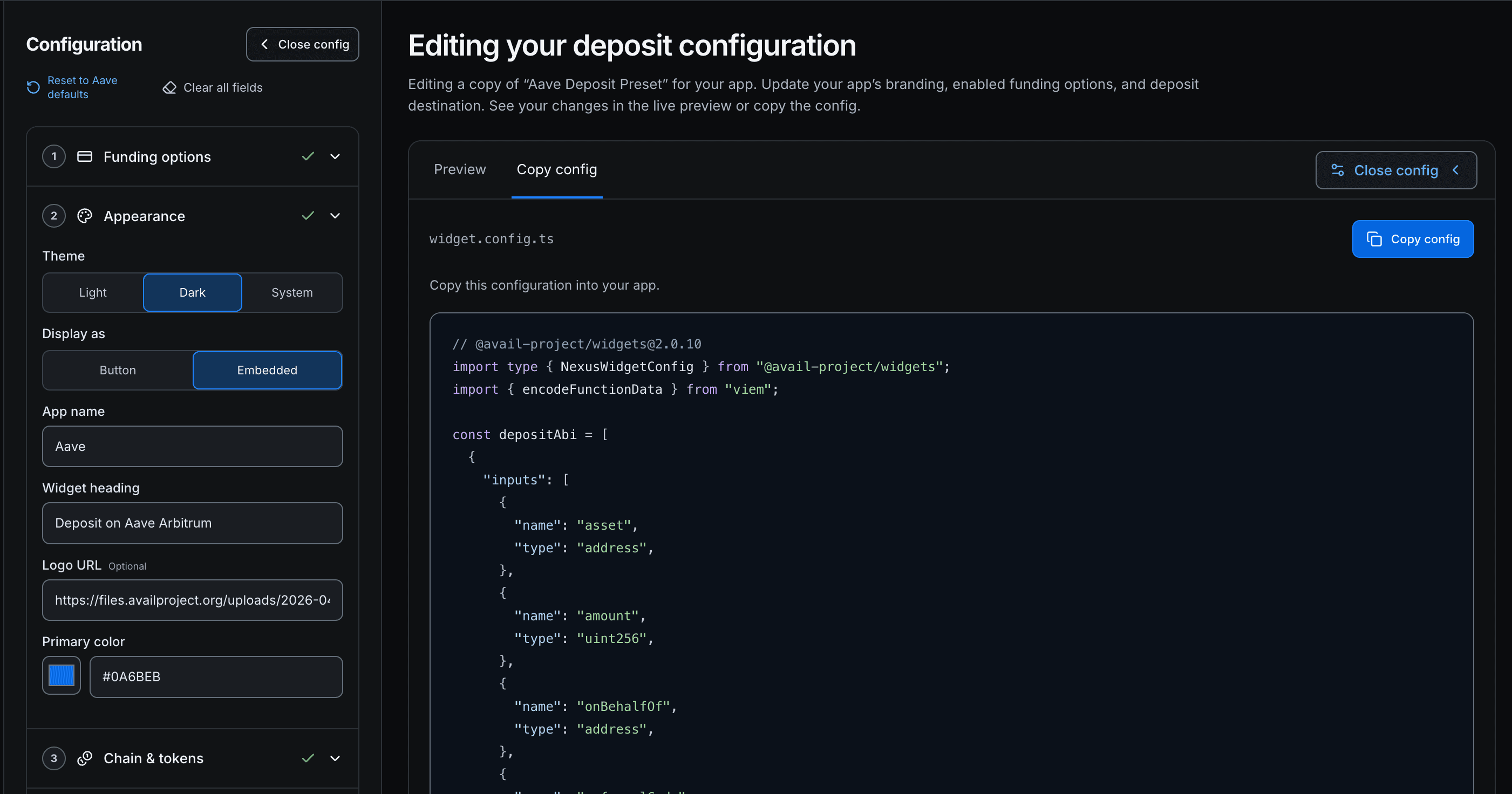 Generate the exact Deposit configuration needed for your app on the demo app. It generates the complete
Set
Installation
pnpm add @avail-project/widgets viem wagmi @tanstack/react-query
Usage
import { NexusWidget } from "@avail-project/widgets";
import { encodeFunctionData } from "viem";
const APP_DEPOSIT_CONTRACT = "0x...";
const DESTINATION_TOKEN = "0x...";
const DESTINATION_CHAIN_ID = 42161;
const APP_DEPOSIT_ABI = [
{
inputs: [
{ internalType: "address", name: "token", type: "address" },
{ internalType: "uint256", name: "amount", type: "uint256" },
{ internalType: "address", name: "user", type: "address" },
],
name: "deposit",
outputs: [],
stateMutability: "nonpayable",
type: "function",
},
] as const;
const depositConfig = {
mode: "deposit",
destination: {
chain: DESTINATION_CHAIN_ID,
tokens: [
{
address: DESTINATION_TOKEN,
symbol: "USDT",
decimals: 6,
logo: "https://example.com/usdt.svg",
},
],
},
depositAddress: APP_DEPOSIT_CONTRACT,
executeDeposit: (_symbol, tokenAddress, amount, _chainId, user) => ({
to: APP_DEPOSIT_CONTRACT,
gas: 400_000n,
data: encodeFunctionData({
abi: APP_DEPOSIT_ABI,
functionName: "deposit",
args: [tokenAddress, amount, user],
}),
tokenApproval: {
toTokenAddress: tokenAddress,
amount,
spender: APP_DEPOSIT_CONTRACT,
},
}),
prefill: {
amount: "10",
},
validation: {
minAmount: "1",
maxAmount: "1000",
},
appearance: {
appName: "Your App",
appLogoURL: "https://example.com/logo.svg",
heading: "Deposit",
mode: "system",
primaryColor: "#0A6BEB",
},
} as const;
<NexusWidget config={depositConfig} connectedAddress={address} />;Configuration
Generate the exact Deposit configuration needed for your app on the demo app. It generates the complete depositConfig object.
Update your app’s branding, enabled funding options, and deposit destination. See your changes in the live preview and copy the config.
Configure Deposit widget
Deposit uses only mode: "deposit". This mode is exact-out: users enter the destination deposit amount, pay-with sources are selected, and the flow submits through swapAndExecute.
| Prop | Required | Description |
|---|---|---|
config.mode | Yes | Must be "deposit". |
config.destination.chain | Yes | Chain ID of the fixed destination network. Deposit destination chain cannot be changed by the user. |
config.destination.tokens | Yes | One or more accepted destination tokens. The token dropdown is limited to this list and is editable only when multiple tokens are supplied. |
config.depositAddress | Yes | Smart contract address for the deposit target. |
config.executeDeposit | Yes | Callback builder returning { to, gas, data?, value?, tokenApproval? } for the final app transaction. gas must be a positive bigint. |
config.enableOnRamp | Optional | Defaults to false. Set true to display "Deposit with Cash" alongside wallet funding. |
config.prefill.amount | Optional | Prefills the exact output deposit amount. Must be greater than 0. |
config.validation.minAmount | Optional | Minimum deposit amount. Must be 0 or greater. |
config.validation.maxAmount | Optional | Maximum deposit amount. Must be greater than 0. |
config.theme | Optional | "dark", "light", or "system". Defaults to light; system follows OS changes. Overrides appearance.mode. |
config.appearance | Optional | Supports heading, appName, appLogoURL, mode, and primaryColor. |
connectedAddress | Optional | Wallet address to use. If omitted, the connected wagmi account is used. |
embed | Optional | Defaults to true. Set false to render as a modal surface. |
open, onOpenChange, defaultOpen | Optional | Control the modal when embed={false}. |
onStart, onComplete, onError, onClose, onConnectClick, onConnectWallet | Optional | Host app callbacks. Use onConnectClick to open your app/header wallet modal from the element CTA. |
enableOnRamp: true to offer wallet and local currency funding. Set it to false or omit it to open directly in the wallet deposit flow. The showcase Onramp toggle demonstrates both settings.
executeDeposit
type ExecuteDeposit = (
tokenSymbol: string,
tokenAddress: `0x${string}`,
amount: bigint,
chainId: number,
user: `0x${string}`,
) => {
to: `0x${string}`;
gas: bigint;
data?: `0x${string}`;
value?: bigint;
tokenApproval?: {
toTokenAddress: `0x${string}`;
amount: bigint;
spender: `0x${string}`;
};
};Modal Usage
embed={false} to invoke Deposit from a button and show the element as a modal.
<NexusWidget
config={depositConfig}
connectedAddress={address}
embed={false}
defaultOpen={false}
/>const [open, setOpen] = useState(false);
<NexusWidget
config={depositConfig}
connectedAddress={address}
embed={false}
open={open}
onOpenChange={setOpen}
/>;Supporting Multiple Opportunities / Selector UI
NexusWidget executes a single targeted deposit flow at a time, build any opportunity selector in your parent component and render NexusWidget with the selected config:
import { useState } from "react";
import { NexusWidget } from "@avail-project/widgets";
import { encodeFunctionData } from "viem";
// Define the Aave & Compound pools/ABIs...
const OPPORTUNITIES = {
aave: {
chain: 42161,
token: {
address: "0xFd086bC7CD5C481DCC9C85ebE478A1C0b69FCbb9",
symbol: "USDT",
decimals: 6,
},
appName: "Aave",
depositAddress: "0x794a61358D6845594F94dc1DB02A252b5b4814aD",
executeDeposit: (symbol, tokenAddress, amount, chainId, user) => ({
to: "0x794a61358D6845594F94dc1DB02A252b5b4814aD",
gas: 400_000n,
data: encodeFunctionData({
/* Aave supply arguments */
}),
tokenApproval: {
toTokenAddress: tokenAddress,
amount,
spender: "0x794a61358D6845594F94dc1DB02A252b5b4814aD",
},
}),
},
compound: {
chain: 8453,
token: {
address: "0x833589fCD6eDb6E08f4c7C32D4f71b54bdA02913",
symbol: "USDC",
decimals: 6,
},
appName: "Compound",
depositAddress: "0xc3d688B66703497DAA19211EEdff47f25384cdc3",
executeDeposit: (symbol, tokenAddress, amount, chainId, user) => ({
to: "0xc3d688B66703497DAA19211EEdff47f25384cdc3",
gas: 400_000n,
data: encodeFunctionData({
/* Compound supply arguments */
}),
tokenApproval: {
toTokenAddress: tokenAddress,
amount,
spender: "0xc3d688B66703497DAA19211EEdff47f25384cdc3",
},
}),
},
};
export function MultiDepositShowcase({ address }) {
const [selectedOpt, setSelectedOpt] =
useState<keyof typeof OPPORTUNITIES>("aave");
return (
<div className="space-y-4">
<div className="flex flex-col gap-1.5 max-w-xs mx-auto">
<label className="text-xs font-semibold text-muted-foreground uppercase tracking-wider">
Select Opportunity
</label>
<select
value={selectedOpt}
onChange={(e) =>
setSelectedOpt(e.target.value as keyof typeof OPPORTUNITIES)
}
className="w-full h-10 px-3 rounded-lg border border-border bg-background text-sm focus:outline-none focus:ring-2 focus:ring-primary focus:border-transparent cursor-pointer"
>
<option value="aave">Aave (USDT on Arbitrum)</option>
<option value="compound">Compound (USDC on Base)</option>
</select>
</div>
<NexusWidget
config={{
mode: "deposit",
enableOnRamp: true, // Optional; defaults to false (wallet funding only).
destination: {
chain: OPPORTUNITIES[selectedOpt].chain,
tokens: [OPPORTUNITIES[selectedOpt].token],
},
depositAddress: OPPORTUNITIES[selectedOpt].depositAddress,
executeDeposit: OPPORTUNITIES[selectedOpt].executeDeposit,
appearance: {
appName: OPPORTUNITIES[selectedOpt].appName,
mode: "system",
},
}}
connectedAddress={address}
/>
</div>
);
}How is this guide?